Subtitle sync
Shift every line by the same amount, or pin two lines to their real times to fix drift - then download the corrected file.
Runs on your device - nothing is uploaded.
HOW IT WORKS
1
Pick your subtitle file
SRT or VTT - it is read in this tab and never uploaded.
2
Shift or stretch
Constant offset for subtitles that are simply early or late. Two-point pinning for subtitles that drift further off over time.
3
Check the preview
The first lines show their old and new timing side by side before you download.
A real correction, line by line
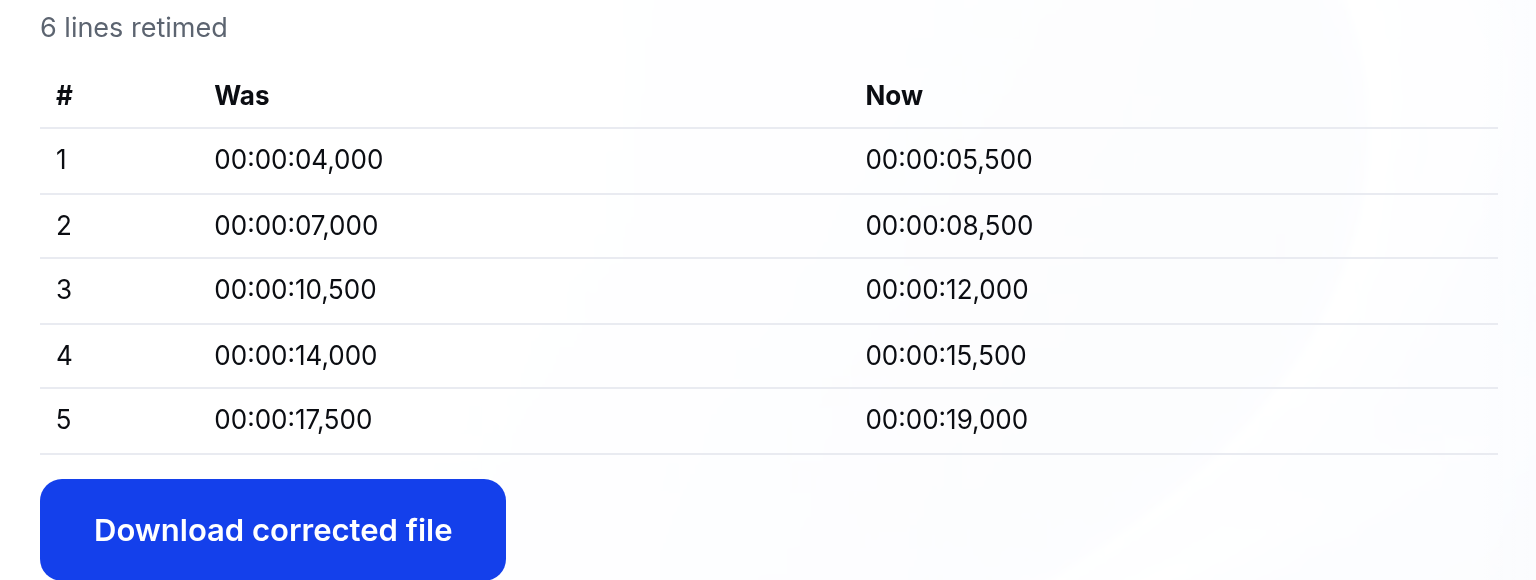
We made a 6-line sample SRT and shifted every cue later by 1.5 seconds. Before download, the preview showed the first cues' old and new timing side by side. This is that run, unedited:
What it will not do
- Read ASS, SSA or subtitles embedded in a video file - standalone .srt and .vtt only.
- Fix wrong, missing or mistyped lines. Only timestamps change; your cue text is never touched.
- Follow drift that speeds up or slows down unevenly. Two-point stretch assumes a constant rate difference - the usual case when frame rates differ.
- Start a cue before 0:00. Shifts that would land earlier are clamped to zero, and the tool tells you how many were.
Questions
When do I use shift vs two-point?+
If every line is off by the same amount (say 2 seconds late), use shift. If lines start fine but drift further off as the video plays, the frame rates differ - pin the first and a late line to their real times with two-point sync.
Which is my line's correct time?+
Play the video, pause when a known line is actually spoken and note the player's timestamp. Use that. A line near the end gives the most accurate stretch.
Will the file format stay the same?+
Yes. SRT in gives SRT out, VTT in gives VTT out, with cue text, numbering and styling untouched - only the timestamps change.
What happens if shifting makes a time negative?+
Those cues start at 0:00 instead, and the tool tells you how many were clamped.